
Harbour building (Dockhafen)
A harbour project from B3nNy that has not started yet. The schematic for the planned harbour ships with the page — the site is waiting for its first block.
Goal
A large harbour building with piers, warehouses and a jetty — a lively hub for shipping and trade.
Current state
Concept is set, construction has not started yet. The schematic acts as the binding blueprint.
- In-game location
- Overworld — see coordinates
- BlueMap position
- -574 / 9 / -239 (Overworld)
For visiting on BlueMap — the Litematica origin lives on each schematic.
- Builders involved
- B3nNy (B3nNy)
- Last updated
- Forum channel
- Open forum channel (opens an external site)
Find it on BlueMap
-574 / 9 / -239(Overworld)
Preview loaded from https://bluemap.onelitefeather.dev/. Open the external site for full functionality.
What is it?
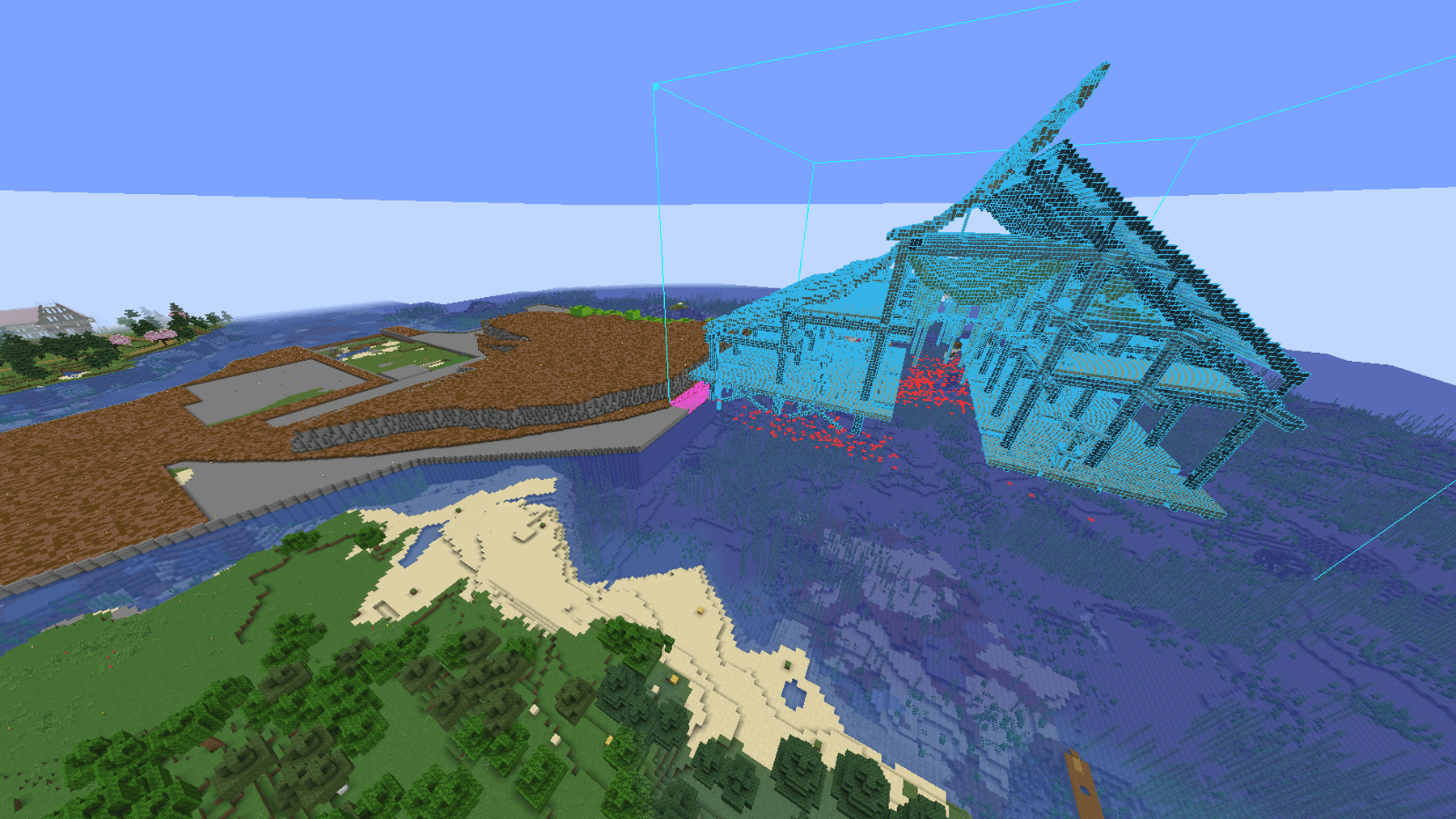
The harbour building is B3nNy's next project: a covered dock hall on stilts reaching well out over the water. Nothing has been built yet — what exists is a finished schematic and a marked-out spot in the bay.
The first two images show exactly that stage: the blue hologram is the Litematica preview of the schematic, projected over the still-empty site. It lets you judge how the building will sit in the landscape, and how far it will reach past the shoreline, before a single block goes down.
What the build is modelled on
The two reference images in the gallery are not from our server — they are renders of the build the schematic follows. They show what matters for the finish: the curved roof, the stilt construction in shallow water, and the interior with its walkways and storage areas.
How can you help?
- Farming materials for timber, supports and roofing
- Ideas for the warehouses and berths inside
- Feedback on the placement before the first block goes down
Get in touch with B3nNy on Discord.
Image gallery
The schematic as a hologram above the site — this is where the dock will stand
Evening light over the future harbour basin
Reference — not our build: exterior views the schematic is modelled on
Reference — not our build: detail and interior shots guiding the finish
Litematica schematics
- Download
Dockhafen
.litematicMC 1.20.4Litematica 0.16.0approx. 359 KB
Point / setup guide
- Recommended origin (X/Y/Z):
- -574 / 9 / -239
- Rotation:
- None
Updated schematic (as of 09/2026). Origin set to the new location -574 / 9 / -239, no rotation — check against the marker on site before pasting.
Load the schematic with the Litematica mod in Minecraft to rebuild the project block by block.
Set up & use Litematica
Quick-start and FAQ around the Litematica mod so you can use the schematics from this overview right away.
What is Litematica?
Litematica is a Minecraft client mod (Fabric) that displays schematic files (.litematic) as a hologram in-game. You can rebuild any project 1:1 without touching the server — other players don't see your hologram.
How do I install the mod?
You need the Fabric loader for your Minecraft version and drop the Litematica JAR (plus its dependency MaLiLib) into the mods/ folder. After launch, check the mods menu to confirm both are active.
How do I load a schematic?
Save the .litematic file in .minecraft/schematics/. In-game, open the Litematica menu (default: M), pick 'Load schematic' and set the position via 'Schematic placement'.
What's the point / setup guide for?
Each schematic ships with a recommended origin and facing direction. Following them places the hologram in the intended spot and aligns it with neighbouring builds.
Which Litematica version do I need?
Each schematic lists the recommended Litematica version (and matching Minecraft version) right next to the file. Stick to that combination — older or newer Litematica releases can serialise blocks differently, which shifts or breaks the hologram.
Can I use auto-place / easy place?
No. OneLiteFeather forbids any kind of auto-place — that includes Easy Place, Place Holder and similar features that set blocks automatically. Violations lead to a permanent ban. Litematica is only allowed as a visual blueprint; you place every block yourself.
Can I use the schematics on my own world?
Yes, of course. The schematics in this overview are free to use privately and on your own servers. Please credit the original builders when sharing publicly.